Agent Evaluation: How to Evaluate LLM Agents
Evaluating AI agents is different from evaluating simple LLM calls. Agents make autonomous, multi-step decisions — calling tools, searching databases, and chaining reasoning — which means a single accuracy score on the final output is not enough. You need to evaluate what the agent did (its trajectory), how it did it (each individual step), and whether the result is correct (the final response).
This guide shows how we think about agent evaluations at Langfuse. Before we dive into the code, let’s establish a clear mental model for what we’re building and testing.
What is an LLM Agent?
An LLM agent is more than just a single call to a language model. It’s an autonomous system that operates in a continuous loop of reasoning and action. The loop begins when the LLM receives an input — either from a user or as feedback from a previous step. Based on this input, the LLM decides on an action, which often involves calling an external tool like a search API, a database query, or a code interpreter. This action interacts with an environment, which then produces feedback (like search results or data) that is fed back to the LLM.
This cycle of reasoning, action, environment interaction, and feedback continues until the agent decides to stop and generate a final answer. This entire sequence of events is what we call a “trace” or a “trajectory” — and it’s what makes agent evaluation uniquely challenging compared to evaluating a single LLM call.
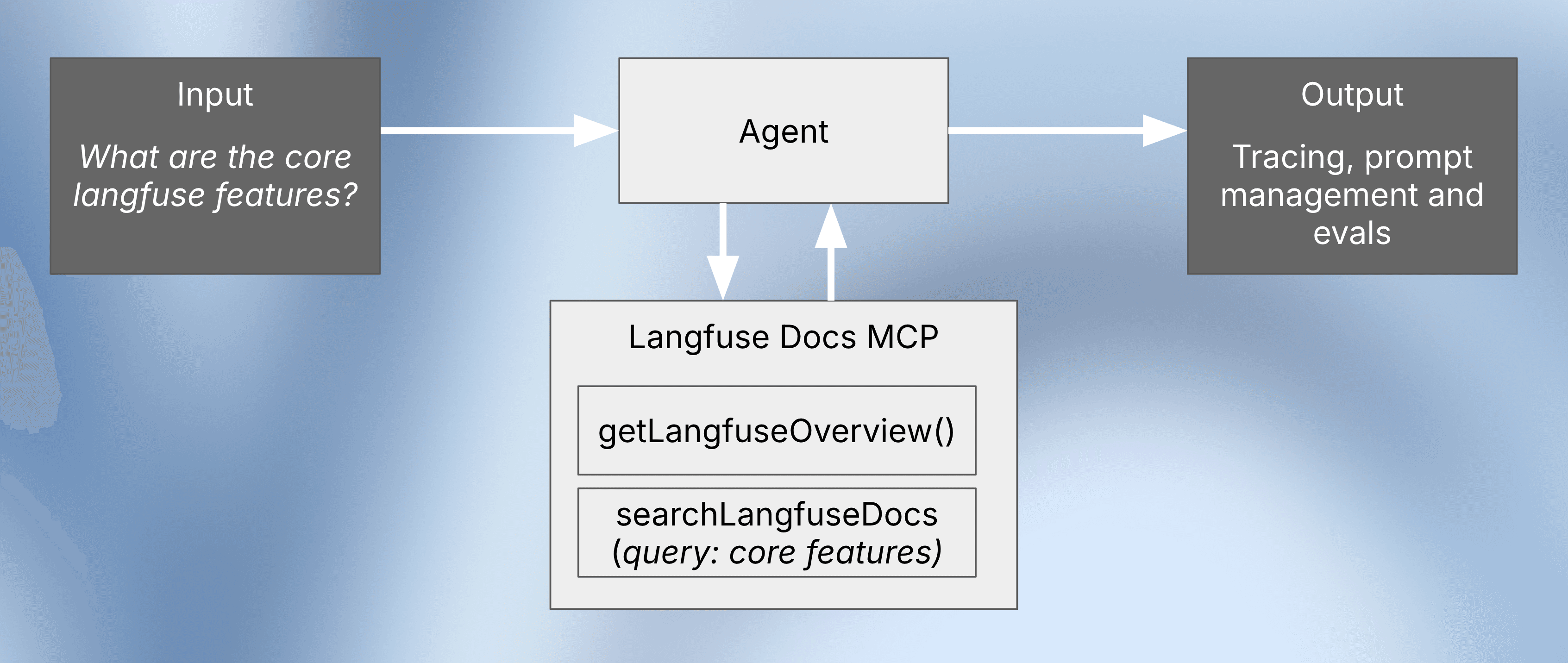
Why Agent Evaluation Matters
Evaluating these complex, multi-step trajectories is important because they can fail in several ways. We might not have given the agent clear enough instructions, or the LLM itself might fail to generalize its reasoning to new or unexpected user questions.
For more on evaluation fundamentals, see Evaluation Concepts.
Common Agent Evaluation Challenges
When working with agents, three problems show up again and again: understanding, specification, and generalization. You often lack understanding of what the agent actually does on real traffic, what tools it calls, and where it gets stuck, because you’re not systematically inspecting traces or linking them to user feedback.
The task is frequently underspecified: prompts and examples don’t clearly encode what “good” behavior is, so the agent improvises in unpredictable ways. And even once you’ve tightened the spec, the agent may still struggle to generalize, performing well on a few handpicked examples but failing on slightly different real-world queries, unless you add systematic, dataset-based evaluations to check robustness at scale.
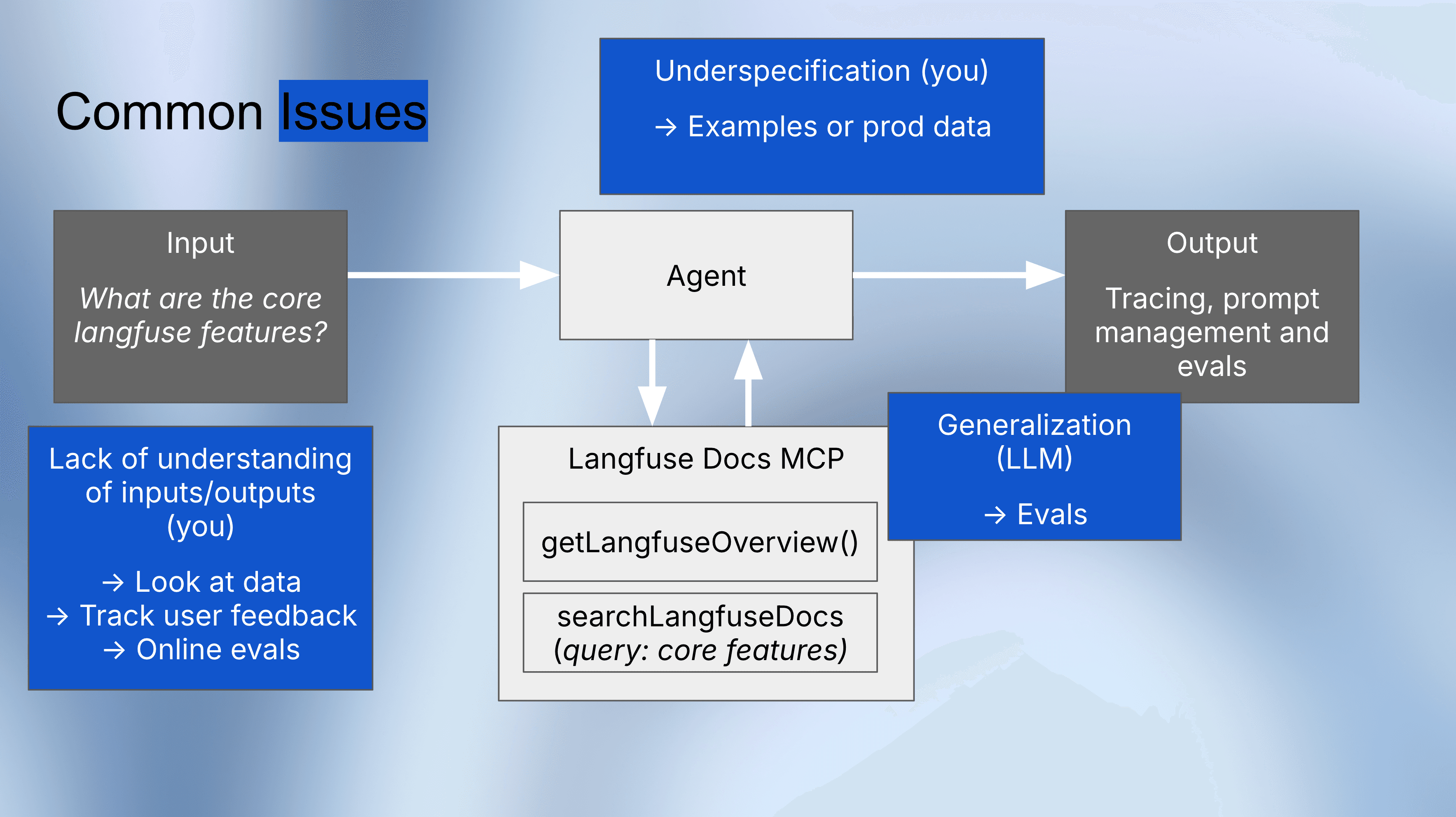
The 3 Phases of Agent Evaluation
Agent evaluation is not a one-time activity — it evolves as your agent matures. The process has three distinct phases:
Phase 1: Early Development (Manual Tracing)
When you’re first building an agent, the most valuable thing you can do is inspect its traces. Manual tracing gives you immediate insight into the agent’s reasoning, tool calls, and failure points. Use Langfuse’s trace viewer to step through each action the agent took.
Phase 2: First Users (Online Evaluation)
As real users interact with your agent, implement feedback mechanisms — like thumbs-up/thumbs-down buttons — to flag problematic traces for review. You can also set up automated online evaluators that score production traces in real time.
Phase 3: Scaling (Offline Evaluation)
The final phase, and the focus of this guide, is creating an automated offline evaluation pipeline. As you scale, you can’t manually review every trace. You need a “gold standard” dataset of inputs and their expected outputs or trajectories. This benchmark allows you to run experiments, prevent regressions, and confidently iterate on prompts, models, and tool configurations.
Three Agent Evaluation Strategies
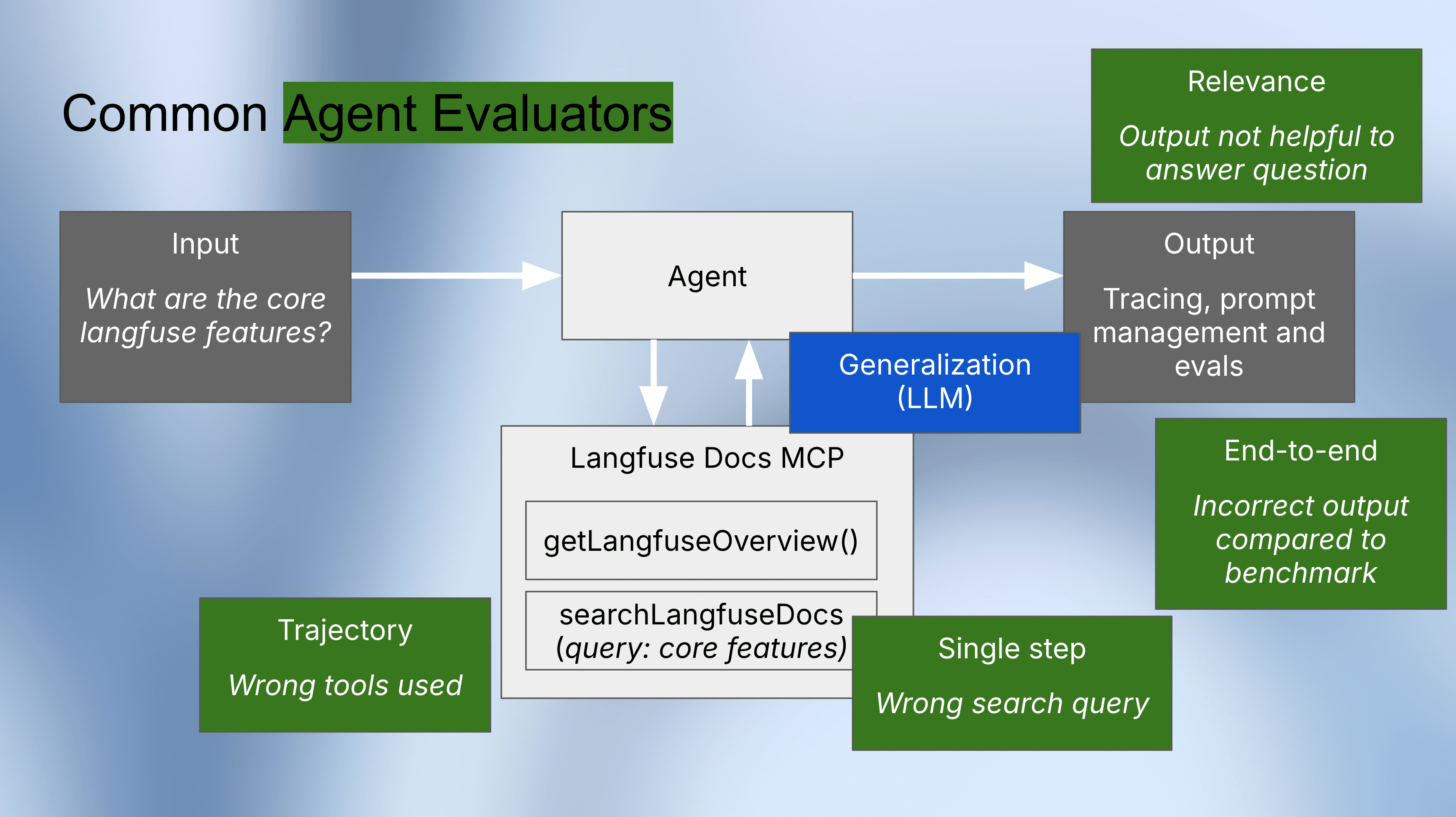
This guide covers three practical, automated evaluation strategies. Each operates at a different level of granularity and answers a different question about your agent’s behavior.
1) Final Response Evaluation (Black-Box):
This method evaluates only the user’s input and the agent’s final answer, ignoring the internal steps entirely. It’s the simplest to set up and works with any agent framework, but it cannot tell you why a failure occurred.
2) Trajectory Evaluation (Glass-Box):
This method checks whether the agent took the “correct path.” It compares the agent’s actual sequence of tool calls against the expected sequence from a benchmark dataset. When the final answer is wrong, trajectory evaluation pinpoints exactly where in the reasoning process the failure occurred.
3) Single Step Evaluation (White-Box):
This is the most granular evaluation strategy, acting like a unit test for agent reasoning. Instead of running the whole agent, it tests each decision-making step in isolation to see if it produces the expected next action. This is especially useful for validating that search queries, API parameters, or tool selections are correct.
Implementation: Evaluate an Agent Step-by-Step
Below, we define a sample agent, create a benchmark dataset, and set up automated LLM-as-a-judge evaluations in Langfuse. While the code uses Pydantic AI, the evaluation patterns generalize to any agent framework.
Want to see agent evaluation with other frameworks? Check out the LangGraph Agent Evaluation guide for a LangGraph-specific walkthrough.
Step 0: Install Packages
%pip install -q --upgrade "pydantic-ai[mcp]" langfuse openai nest_asyncio aiohttpStep 1: Set Environment Variables
Get your Langfuse API keys from project settings.
import os

os.environ["LANGFUSE_PUBLIC_KEY"] = "pk-lf-..."
os.environ["LANGFUSE_SECRET_KEY"] = "sk-lf-..."
os.environ["LANGFUSE_HOST"] = "https://cloud.langfuse.com"  # EU region
# os.environ["LANGFUSE_HOST"] = "https://us.cloud.langfuse.com"  # US region

os.environ["OPENAI_API_KEY"] = "sk-proj-..."
Step 2: Enable Langfuse Tracing
Enable automatic tracing for Pydantic AI agents.
from langfuse import get_client
from pydantic_ai.agent import Agent

langfuse = get_client()
assert langfuse.auth_check(), "Langfuse auth failed - check your keys"

Agent.instrument_all()
print("✅ Pydantic AI instrumentation enabled")
Step 3: Create Agent
Build an agent that searches Langfuse docs using the Langfuse Docs MCP Server.
from typing import Any
from pydantic_ai import Agent, RunContext
from pydantic_ai.mcp import MCPServerStreamableHTTP, CallToolFunc, ToolResult

LANGFUSE_MCP_URL = "https://langfuse.com/api/mcp"

async def run_agent(item, system_prompt="You are an expert on Langfuse. ", model="openai:gpt-4o-mini"):
    langfuse.update_current_trace(input=item.input)

    tool_call_history = []

    async def process_tool_call(
        ctx: RunContext[Any],
        call_tool: CallToolFunc,
        tool_name: str,
        args: dict[str, Any],
    ) -> ToolResult:
        tool_call_history.append({"tool_name": tool_name, "args": args})
        return await call_tool(tool_name, args)

    langfuse_docs_server = MCPServerStreamableHTTP(
        url=LANGFUSE_MCP_URL,
        process_tool_call=process_tool_call,
    )

    agent = Agent(
        model=model,
        system_prompt=system_prompt,
        toolsets=[langfuse_docs_server],
    )

    async with agent:
        result = await agent.run(item.input["question"])

        langfuse.update_current_trace(
            output=result.output,
            metadata={"tool_call_history": tool_call_history},
        )

        return result.output, tool_call_history
Step 4: Create Evaluation Dataset
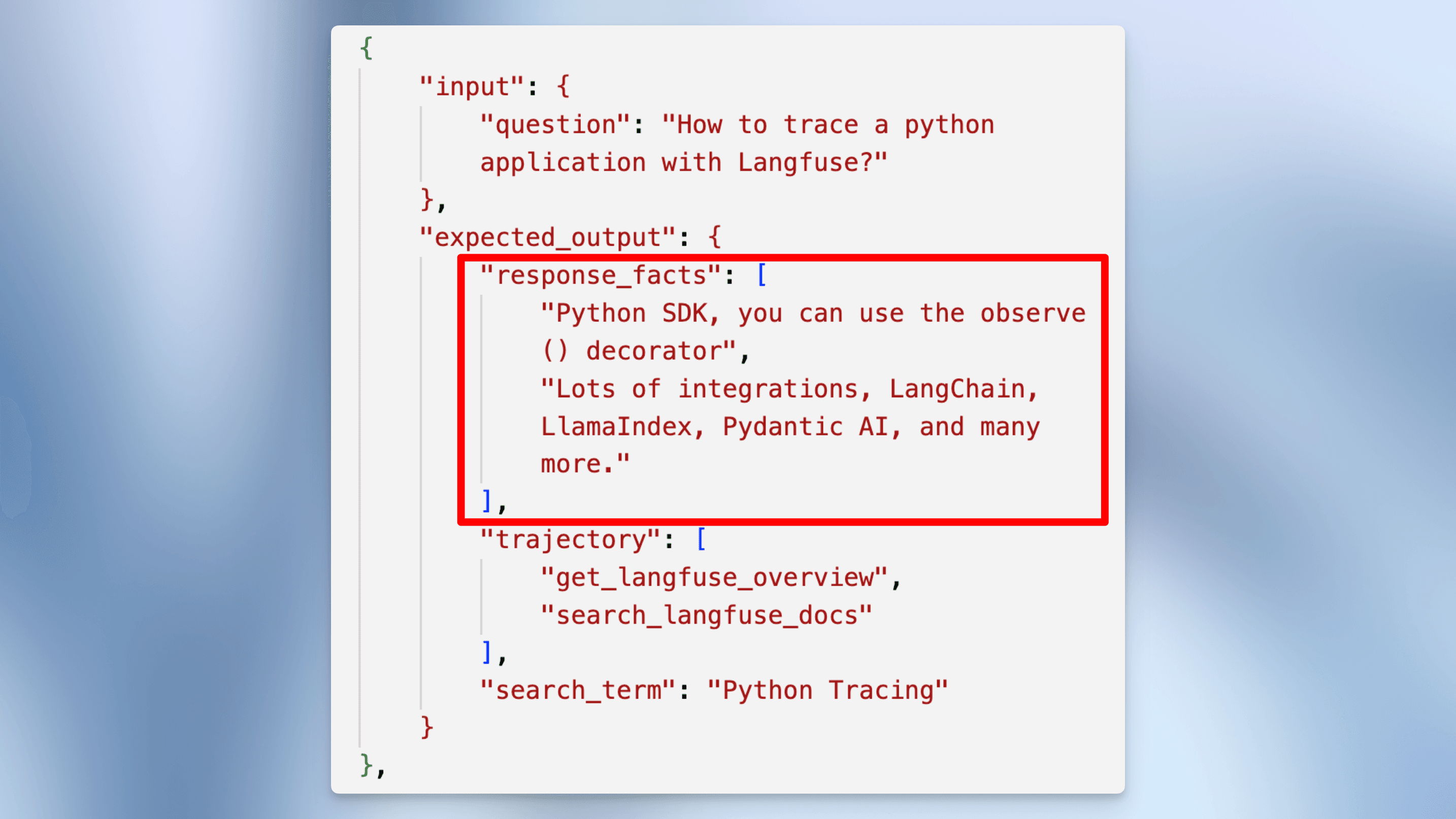
Build a benchmark dataset with test cases. Each case includes:
input: User questionexpected_output.response_facts: Key facts the response must containexpected_output.trajectory: Expected sequence of tool callsexpected_output.search_term: Expected search query (if applicable)
test_cases = [
    {
        "input": {"question": "What is Langfuse?"},
        "expected_output": {
            "response_facts": [
                "Open Source LLM Engineering Platform",
                "Product modules: Tracing, Evaluation and Prompt Management"
            ],
            "trajectory": ["getLangfuseOverview"],
        }
    },
    {
        "input": {"question": "How to trace a python application with Langfuse?"},
        "expected_output": {
            "response_facts": [
                "Python SDK, you can use the observe() decorator",
                "Lots of integrations, LangChain, LlamaIndex, Pydantic AI, and many more."
            ],
            "trajectory": ["getLangfuseOverview", "searchLangfuseDocs"],
            "search_term": "Python Tracing"
        }
    },
    {
        "input": {"question": "How to connect to the Langfuse Docs MCP server?"},
        "expected_output": {
            "response_facts": [
                "Connect via the MCP server endpoint: https://langfuse.com/api/mcp",
                "Transport protocol: `streamableHttp`"
            ],
            "trajectory": ["getLangfuseOverview"]
        }
    },
    {
        "input": {"question": "How long are traces retained in langfuse?"},
        "expected_output": {
            "response_facts": [
                "By default, traces are retained indefinitely",
                "You can set custom data retention policy in the project settings"
            ],
            "trajectory": ["getLangfuseOverview", "searchLangfuseDocs"],
            "search_term": "Data retention"
        }
    }
]

DATASET_NAME = "pydantic-ai-mcp-agent-evaluation"

dataset = langfuse.create_dataset(name=DATASET_NAME)
for case in test_cases:
    langfuse.create_dataset_item(
        dataset_name=DATASET_NAME,
        input=case["input"],
        expected_output=case["expected_output"]
    )
Step 5: Set Up Evaluators
Create three evaluators in the Langfuse UI. Each tests a different aspect of agent behavior. You can find the documentation on setting them up here.
1. Final Response Evaluation (Black Box)
Tests output quality. Works regardless of internal implementation.
Prompt template:
You are a teacher grading a student based on the factual correctness of their statements.

### Examples

#### Example 1:
- Response: "The sun is shining brightly."
- Facts to verify: ["The sun is up.", "It is a beautiful day."]
- Reasoning: The response includes both facts.
- Score: 1

#### Example 2:
- Response: "When I was in the kitchen, the dog was there"
- Facts to verify: ["The cat is on the table.", "The dog is in the kitchen."]
- Reasoning: The response mentions the dog but not the cat.
- Score: 0

### New Student Response

- Response: {{response}}
- Facts to verify: {{facts_to_verify}}
2. Trajectory Evaluation (Glass Box)
Verifies the agent used the correct sequence of tools.
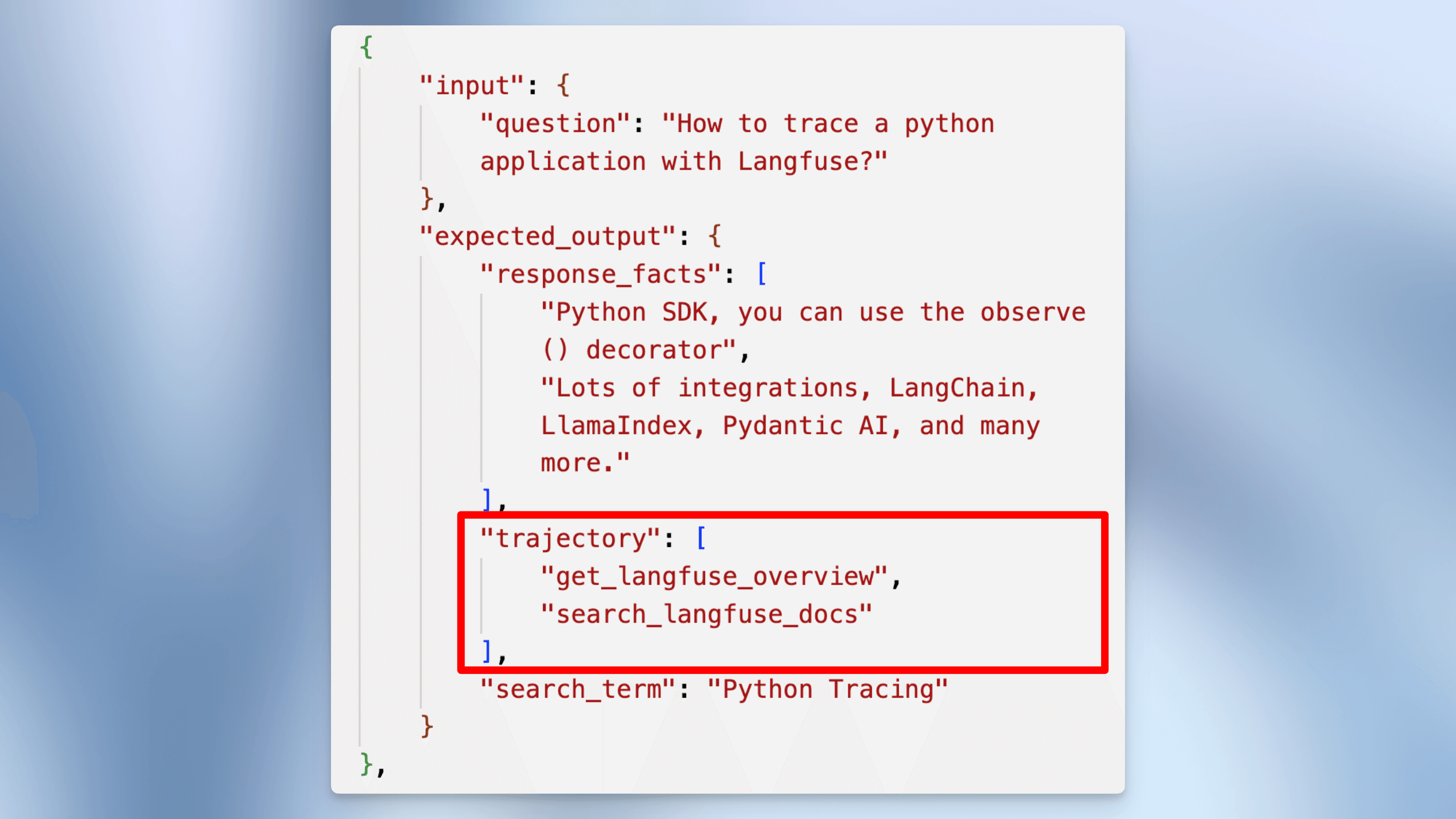
Prompt template:
You are comparing two lists of strings. Check whether the lists contain exactly the same items. Order does not matter.

## Examples

Expected: ["searchWeb", "visitWebsite"]
Output: ["searchWeb"]
Reasoning: Output missing "visitWebsite".
Score: 0

Expected: ["drawImage", "visitWebsite", "speak"]
Output: ["visitWebsite", "speak", "drawImage"]
Reasoning: Output matches expected items.
Score: 1

Expected: ["getNews"]
Output: ["getNews", "watchTv"]
Reasoning: Output contains unexpected "watchTv".
Score: 0

## This Exercise

Expected: {{expected}}
Output: {{output}}
3. Search Quality Evaluation
Validates search query quality when agents search documentation.
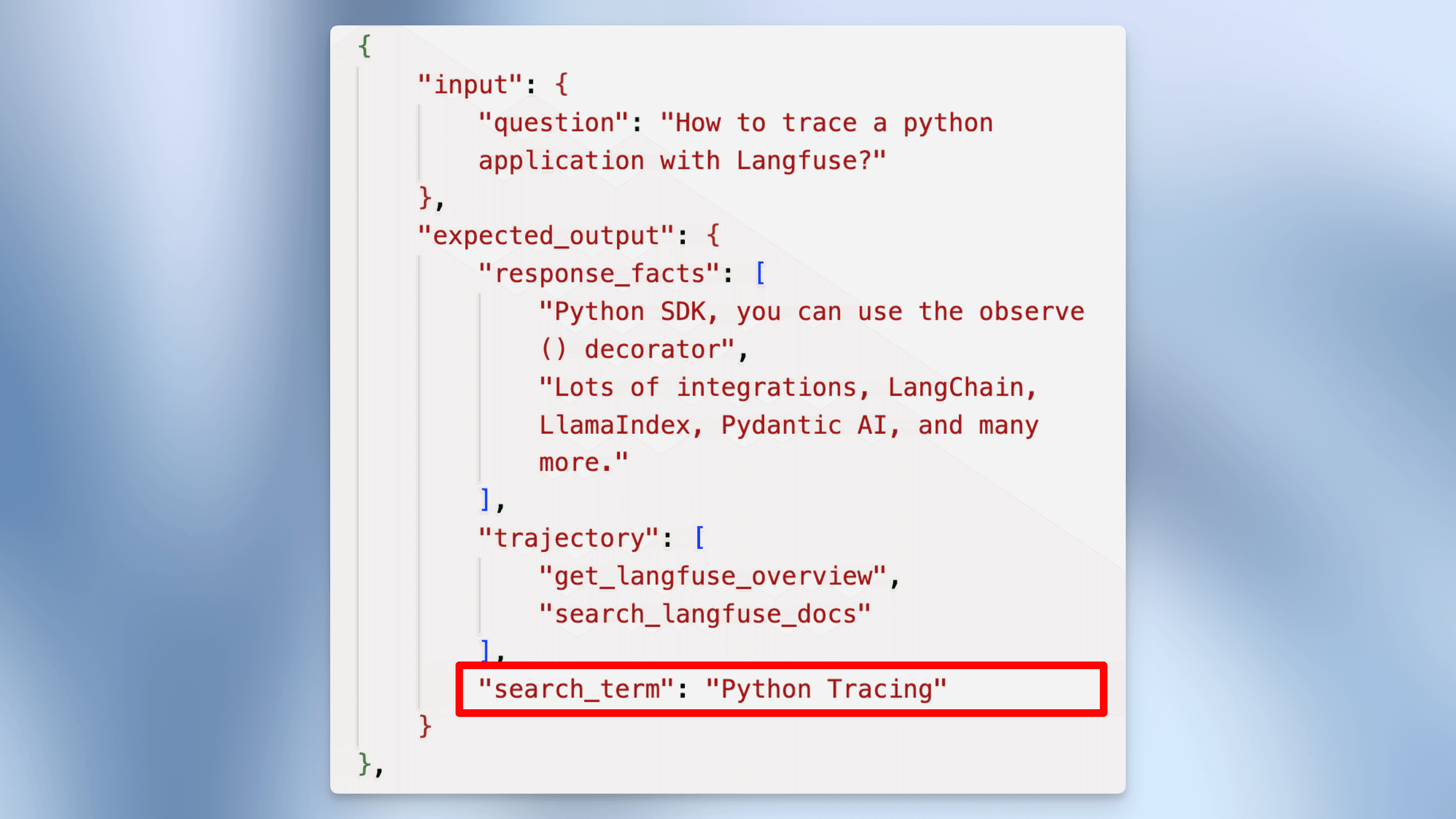
Prompt template:
You are grading whether a student searched for the right information. The search term should correspond vaguely with the expected term.

### Examples

Response: "How can I contact support?"
Expected search topics: Support
Reasoning: Response searches for support.
Score: 1

Response: "Deployment"
Expected search topics: Tracing
Reasoning: Response doesn't match expected topic.
Score: 0

Response: (empty)
Expected search topics: (empty)
Reasoning: No search expected, no search done.
Score: 1

### New Student Response

Response: {{search}}
Expected search topics: {{expected_search_topic}}
Create these evaluators in Langfuse UI under Prompts → Create Evaluator.
Step 6: Run Experiments
Run agents on your dataset. Compare different models and prompts to find the best configuration.
dataset = langfuse.get_dataset(DATASET_NAME)

result = dataset.run_experiment(
    name="Production Model Test",
    description="Monthly evaluation of our production model",
    task=run_agent
)

print(result.format())
Step 7: Compare Multiple Configurations
Test different prompts and models to find the best configuration.
from functools import partial

system_prompts = {
    "simple": (
        "You are an expert on Langfuse. "
        "Answer user questions accurately and concisely using the available MCP tools. "
        "Cite sources when appropriate."
    ),
    "nudge_search": (
        "You are an expert on Langfuse. "
        "Answer user questions accurately and concisely using the available MCP tools. "
        "Always cite sources when appropriate. "
        "When unsure, use getLangfuseOverview then search the docs. You can use these tools multiple times."
    )
}

models = ["openai:gpt-5-mini", "openai:gpt-5-nano"]

dataset = langfuse.get_dataset(DATASET_NAME)

for prompt_name, prompt_content in system_prompts.items():
    for test_model in models:
        task = partial(
            run_agent,
            system_prompt=prompt_content,
            model=test_model,
        )

        result = dataset.run_experiment(
            name=f"Test: {prompt_name} {test_model}",
            description="Comparing prompts and models",
            task=task
        )

        print(result.format())
Agent Evaluation Best Practices
Based on our experience helping teams evaluate agents in production, here are key best practices:
-
Start with tracing, not scoring. Before you build automated evaluations, spend time manually reviewing agent traces. The patterns you observe will inform what metrics matter most for your use case. Use Langfuse tracing to inspect every tool call, reasoning step, and intermediate output.
-
Define success criteria before writing evaluators. For each test case, explicitly define what “correct” looks like at each level — the expected final answer, the expected tool sequence, and the expected search queries. Vague criteria lead to unreliable evaluations.
-
Use all three evaluation levels together. Final response evaluation tells you what went wrong. Trajectory evaluation tells you where it went wrong. Single step evaluation tells you why it went wrong. Together, they give you a complete picture.
-
Build your dataset from real failures. The most valuable test cases come from production traces where the agent failed. Use annotation queues to systematically review and label problematic traces, then add them to your evaluation dataset.
-
Run evaluations in CI/CD. Integrate agent evaluation into your deployment pipeline using experiments via SDK. Block deployments that cause score regressions on your benchmark dataset.
-
Compare configurations systematically. When changing prompts, models, or tools, run the same evaluation dataset across all configurations to make data-driven decisions. The experiment comparison view in Langfuse makes this straightforward.
Next Steps
Now that you have a working agent evaluation pipeline, here are ways to extend it:
- Scale your dataset with synthetic data generation to cover more edge cases
- Add online evaluation to score production traces in real time using LLM-as-a-Judge
- Evaluate multi-turn conversations if your agent handles multi-turn dialogue
- Monitor agent performance over time with custom dashboards and score analytics
- Explore the full evaluation roadmap in our comprehensive evaluation guide
Frequently Asked Questions
What is agent evaluation?
Agent evaluation is the process of systematically testing and measuring the performance of AI agents — autonomous systems that use LLMs to make decisions, call tools, and complete multi-step tasks. Unlike evaluating a single LLM call, agent evaluation must assess the entire trajectory of actions, not just the final output.
How is agent evaluation different from LLM evaluation?
Standard LLM evaluation checks whether a model produces a correct or high-quality response to a given prompt. Agent evaluation is more complex because agents make multiple decisions in sequence — choosing which tools to call, what parameters to pass, and when to stop. You need to evaluate not just the final answer, but also the reasoning path (trajectory) and each individual decision (single step).
What are the main types of agent evaluation?
There are three main types: Final Response (Black-Box) evaluation checks only the end result; Trajectory (Glass-Box) evaluation checks whether the agent took the correct sequence of actions; and Single Step (White-Box) evaluation tests each individual decision in isolation. Most production systems use a combination of all three.
How do I build an agent evaluation dataset?
Start by defining test cases that represent your most common and most critical user interactions. Each test case should include the user input, expected facts in the response, the expected sequence of tool calls (trajectory), and expected parameters for key tool calls. Grow your dataset over time by adding cases from real production failures.
Can I use LLM-as-a-judge for agent evaluation?
Yes. LLM-as-a-judge is one of the most effective approaches for agent evaluation because agent outputs are often too complex for simple rule-based checks. You can use different judge prompts for each evaluation level — one for final response quality, one for trajectory correctness, and one for individual step quality. See the LLM-as-a-Judge documentation for setup instructions.
How often should I run agent evaluations?
Run offline evaluations (experiments) before every deployment that changes prompts, models, or tool configurations. Run online evaluations continuously on production traces to catch issues in real traffic. For a comprehensive approach, see the evaluation overview.